Quickstart
For anyone running canvas-drop for the first time: by the end of this page you
have an instance on your machine, a canvas at a live URL, and the three ways to
put content on it (the dashboard, the editor, and the keyed Deploy API). The
default profile needs no external services: SQLite, local disk storage, path
URL mode, and dev auth that signs you in automatically.
Run an instance locally
You need Node 24 or newer (.nvmrc says 24) and pnpm; the repo pins
pnpm@11.0.9 in package.json.
git clone https://github.com/markpasternak/canvas-drop.git
cd canvas-drop
pnpm install
cp .env.example .env
pnpm dev| URL | What it serves |
|---|---|
http://localhost:5173 |
The dashboard (Vite dev server with HMR). It proxies /api, /auth, /v1, /docs, /llms.txt, /skill.zip, /welcome, and /og.png to the server. |
http://localhost:3000 |
The Hono server: management API, Deploy API, MCP at /mcp, docs, and the canvases themselves at /c/{slug}/. Canvas URLs always point here, not at :5173. |
curl http://localhost:3000/healthz
# 200 {"status":"ok","db":"ok","version":"..."}   (503 "degraded" until the DB answers)
What pnpm dev does: it loads .env once (Node's --env-file-if-exists, so
variables you export in the shell still win), seeds an empty database with
sample canvases, then runs the server (tsx watch), the dashboard (vite), and
the browser SDK build (esbuild --watch) in parallel. Only pnpm dev reads
.env; a production process takes its config from the environment (see
Configuration). In production the server
serves the built dashboard itself on :3000; the Vite server is dev-only.
With CANVAS_DROP_DEV_SEED=0, a fresh instance starts here:
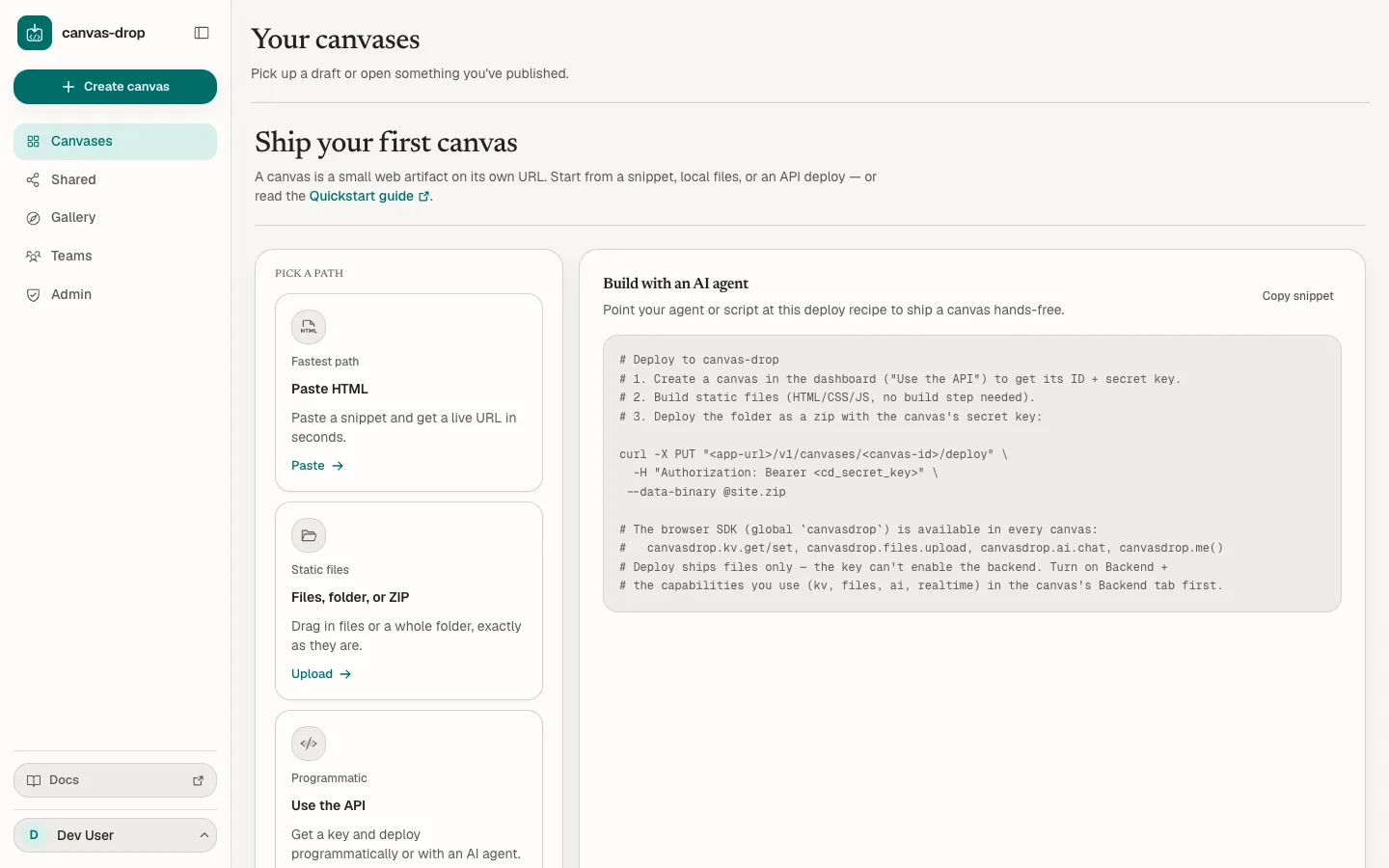
The sample data is 100 canvases with no files across seven owners, 70 of them yours, so the dashboard, Shared, and the gallery are populated on first boot. The seed runs only when the database has no canvases.
| Command | Effect |
|---|---|
pnpm dev:stop |
Stops the whole tree (Ctrl-C works too). pnpm dev:restart restarts it. |
CANVAS_DROP_DEV_SEED=0 pnpm dev |
Starts without the sample canvases. |
pnpm reset:data |
Deletes the local SQLite file and the local storage directory. pnpm dev:fresh resets, reseeds, and starts. |
CANVAS_DROP_PORT=3001 pnpm dev |
Moves the server if :3000 is taken; the dashboard proxy follows. CANVAS_DROP_DASHBOARD_PORT moves the dashboard. |
Data lives at ./data/canvasdrop.db (SQLite) and ./data/storage (uploaded
files). Both paths are the defaults of CANVAS_DROP_SQLITE_PATH and
CANVAS_DROP_STORAGE_PATH.
Who you are signed in as
In dev auth mode every request is dev@example.com (Dev User), and that
account is an admin: CANVAS_DROP_ADMIN_EMAILS defaults to the dev user in this
mode. Override the identity with CANVAS_DROP_DEV_USER_EMAIL and
CANVAS_DROP_DEV_USER_NAME in .env. dev mode refuses to boot when
NODE_ENV=production; a real instance uses proxy or oidc auth, and can swap
in Postgres (CANVAS_DROP_DB=postgres) and S3-compatible storage
(CANVAS_DROP_STORAGE=s3). Each of those is a config change, not a code change:
see Configuration and
Install.
Prefer Docker?
docker compose up --build starts a demo stack at http://localhost:8080: the
app in real proxy auth mode behind oauth2-proxy and a bundled Dex identity
provider, plus Postgres. Sign in as demo@example.com / canvasdrop. Only
Caddy publishes a port; the app itself is unreachable from the host. Details
and the production shape are in Install.
Create a canvas
Click Create canvas in the dashboard (or open /new). Pick a source:
| Source | What happens |
|---|---|
| Paste HTML | A single index.html, created and published in one step. |
| Upload files | Select files, a folder, or one ZIP, review the summary, then click Create and publish. Relative paths are preserved; archives are checked and extracted server-side. |
| Use the API | Mints an empty canvas plus a per-canvas key (shown once) and a ready-to-run curl command. The canvas stays unpublished until your first deploy. |
Review your content first, then set the title, workspace, and audience (Restricted by default). Custom slug and backend controls are under Optional settings. Paste and upload publish when you explicitly click Create and publish. The result shows your link and lets you save the optional deploy key or continue without it.
Every canvas gets a slug and a URL. The default slug is random
(quiet-otter-x7k2); a custom slug is lowercase letters, digits, and hyphens,
1 to 63 characters, no leading or trailing hyphen, with a reserved-word list
(api, admin, docs, mcp, and similar). Change it later under
Settings → URL & routing → Change slug; leave the field empty for a fresh
random one. The old URL stops working immediately.
| URL mode | Canvas URL | Locally |
|---|---|---|
path (default) |
{base}/c/{slug}/ |
http://localhost:3000/c/quiet-otter-x7k2/ |
subdomain |
{slug}.{baseHost} |
not available on localhost; for example quiet-otter-x7k2.canvases.example.com |
Add content
A canvas is static files, served as-is. No build step runs on the server. The
page at the canvas URL is the index.html at the root (a canvas whose only
HTML file sits elsewhere serves that file instead):
<!doctype html>
<html>
  <body>
    <h1>Hello from my canvas</h1>
  </body>
</html>
Limits: 100 MB per canvas, 25 MB per file, 2 000 files. Each publish creates an immutable version; the last 10 are kept, and identical files are stored once.
Give it a backend (optional)
The browser SDK gives a canvas six fixed primitives (KV, files, AI, identity, realtime, and admin-granted Connections) with no keys in the page. Identity comes from the signed-in session, and the SDK works out which canvas it is running in from the page URL:
<script src="/sdk/v1.js"></script>
<script type="module">
  const me = await canvasdrop.me();
  await canvasdrop.kv.user.set("theme", "dark"); // this person's private preference
</script>
The backend is off by default. Turn on Enable backend in the canvas's
Backend tab, then the primitives you need: Key-value storage, File storage,
AI, Realtime, and Authoring (a canvas that creates canvases; off by default per
canvas and per instance, CANVAS_DROP_AUTHORING defaults to off). Identity
(me()) is on whenever the backend is on. A primitive is live only when the
backend is on, its own toggle is on, and the operator has it available: AI
needs CANVAS_DROP_AI_API_KEY set on the server, realtime needs
CANVAS_DROP_REALTIME=on (the default). A call to a primitive that is not live
throws CapabilityDisabledError. See the SDK overview and
Capabilities.
For comments or other authored items, configure a named collection inside Key-value storage. Each collection has its own access policy. Files can use named file groups; Realtime uses named channels. See Data storage to choose shared values, private preferences or collections, and Permissions and defaults for the resource mapping.
Connections are granted separately by an administrator. They let a canvas call one
pre-approved HTTPS origin with controlled methods and protected headers—for example, a
stock-data API that requires a server-side credential or fixed User-Agent. See
Connections.
Publish and share
Two words mean different things here. Publish turns the editor's draft into a new immutable version. Deploy (folder, ZIP, paste, or the Deploy API) publishes a version directly, with no draft step; the New version button on every detail tab does this for an existing canvas.
The Editor tab works on a mutable draft with autosave. Publish (⌘↵ or Ctrl+Enter) snapshots it into a new version and points the canvas URL at it. Two people editing the same file cannot silently overwrite each other; a stale save shows a conflict banner instead. The Versions tab lists every kept version: Make current re-points the live URL at it (in either direction), Restore copies one back into the draft, Download ZIP exports it.
The Sharing and permissions page sets who can open the canvas, in two parts. People and teams with direct access names people (by email) and teams, each as a viewer or an editor; that list always applies, and a brand-new email becomes live only after that person's first verified sign-in. General access says who else can open the URL (opening it to the org or the public needs a published version):
| General access | Who else can open the URL |
|---|---|
| Restricted (default) | Nobody beyond you, your editors, and the people and teams on the list. A non-owner admin is treated like any member and gets a 404. |
| Whole org | Any signed-in member with the link. |
| Public link | Anyone with the link, static files only: the primitives are refused for anonymous visitors. Needs the instance's public-links switch (on by default) and the owner account's public-link permission (granted by default, revocable by an admin). |
On top of any choice you can add a password gate or a share expiry. People and teams on the list see the canvas in Shared at once; a Whole-org share is link-only until you turn on List for your org. The gallery is narrower: it lists only Public-link canvases and Whole-org canvases whose owners turn on List in the gallery. Revoking access takes effect on the next request. Details in Sharing & access.
Deploy as an agent
Scripts and agents deploy over HTTP with the per-canvas key and no dashboard session. The key is shown once at creation; an owner or editor can mint a new one under Settings → Regenerate key.
curl -fsS -X PUT "http://localhost:3000/v1/canvases/{id}/deploy" \
  -H "Authorization: Bearer $CANVAS_KEY" \
  --data-binary @site.zip
# 200 {"url":"http://localhost:3000/c/quiet-otter-x7k2/","version":1,"fileCount":3,"totalBytes":4096,"warnings":[]}
The key operates only on its own canvas and never belongs in canvas files (a
deploy that embeds one returns a warning). Deploys are limited to 10 per minute
per canvas. The same surface offers GET /v1/canvases/{id}/files to read the
live version back, POST …/rollback, POST …/unpublish, and a staged upload
(begin, send only the blobs the server is missing, finalize) for large or
frequently redeployed canvases. See the Deploy API.
Agents can also connect once to the instance's MCP server
at {base}/mcp (on by default; OAuth 2.1 through your own sign-in) for the
full owner and editor surface, install the agent skill,
or read the whole contract at /llms.txt.
Where next
- Authors: Create & publish, The editor, Teams.
- Operators: Install, Configuration, Security model, Deploy.